Built for HR & People Ops leaders
|
Time Flow gives HR and People Ops a clear, respectful view of how work happens—so you can support high performers, spot risks early, and lead with data, not guesswork.
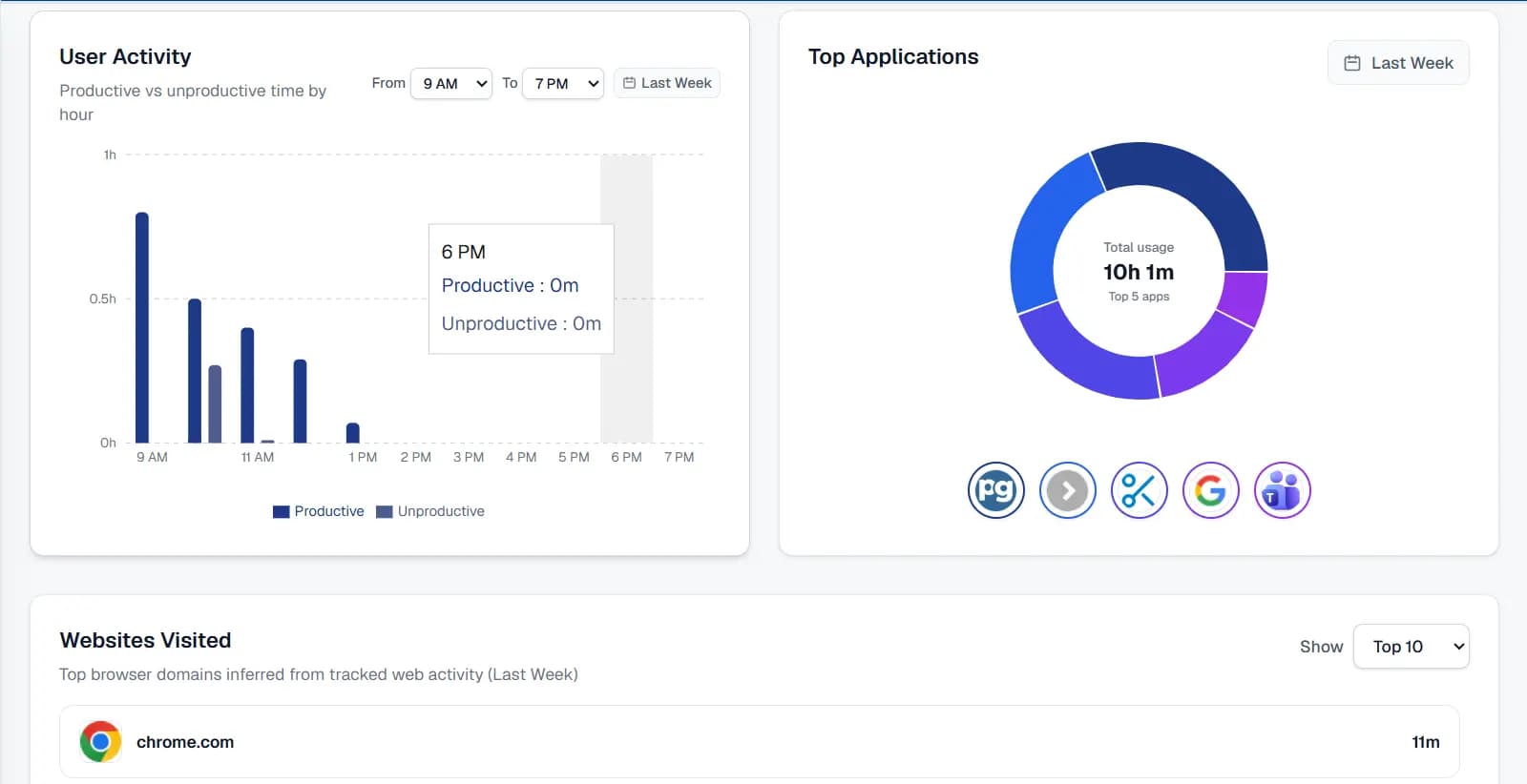
Why teams choose Time Flow
Traditional monitoring tools create noise, not clarity
With Time Flow, teams move from raw screenshots and noisy logs to clear, respectful, actionable insight.
- Manual screenshot reviews and spreadsheets eat up hours every week.
- Raw activity logs are hard to interpret and easy to misread.
- Employees feel watched, not supported.
Time Flow turns real activity into actionable insight.
- Automatic, high-fidelity activity capture across apps, windows, and input devices.
- Meaningful summaries for HR and managers—no technical log parsing required.
- Transparent policies and configurable rules that respect your culture.
Outcomes your HR team can feel
Move beyond raw activity logs to a shared, objective view of how work happens—without adding more reporting burden to managers or employees.
See how work really happens.
Understand focus time, context switching, and idle patterns across teams without chasing individual screenshots.
Protect your high performers.
Spot early signs of overload or burnout with activity trends instead of waiting for annual reviews.
Stop fake activity before it becomes risk.
Advanced fake-activity detection highlights suspicious patterns so you can address issues calmly and fairly.
Standardize how productivity is measured.
Give every manager the same, reliable view of time and tools, so performance conversations feel consistent and fair.
How Time Flow fits into your day-to-day
Simple process from sign-up to daily use—then configure and see your data.
Registration
Create your account and get access to the Time Flow platform.
Download
Download the lightweight Windows agent installer from the portal.
Install
Install the agent on your Windows desktop in a few minutes.
Use this
Start using Time Flow. Later, configure settings and view your team's activity data in the dashboard.
Download
Install the Time Flow Windows agent in minutes and start tracking activity.
No credit card required · Install in minutes · Works with Windows desktops
Powerful features for complete activity monitoring
Track user activity, capture screens and videos, detect fake activity, control applications, and manage everything in real time—from a single platform.
Application & Website Tracking
Monitor desktop applications and websites with precise timestamps across every user session.
- Application tracking
- Website tracking
- Activity timeline with exact start and end times
Browser Tabs Tracking
See which browser tabs users open, switch to, and keep active during work hours.
- Tab-level visibility
- Browser session tracking
- Accurate focus detection
Automatic Screenshots & Videos
Capture screens and video at configurable intervals during active sessions.
- Scheduled screenshot capture
- Automatic video recording
- Sensitive screen protection during capture
Fake Activity Detection
Advanced pattern analysis to detect scripted or spoofed interactions.
- Keystroke pattern analysis
- Suspicious activity alerts
- Rule-based fake activity detection
Productive & Unproductive App Control
Categorize and control which applications users can access during work.
- Block unproductive applications
- Allow only productive applications
- Role-based application policies
User Productive Mapping
Map productive and unproductive applications to users, roles, and departments.
- Per-user productivity rules
- Department-level mapping
- Flexible productive/unproductive lists
Live Monitoring
Request live screenshots, videos, and screen streams from user machines in real time.
- On-demand live screenshots
- Live video capture
- Real-time screen streaming
Call Detection
Automatically detect when users join voice or video calls during monitored sessions.
- In-call status detection
- Call-aware activity tracking
- Better context for productivity review
USB Detection
Track USB device connections, removals, and related file activity across endpoints.
- USB plug and unplug events
- Device and session logging
- File activity visibility
Task Management
Create, assign, and manage tasks for employees directly from the admin dashboard.
- Task creation and assignment
- Project-based organization
- Employee task visibility
Employee Dashboard
Give employees a dedicated dashboard to view their activity, tasks, and daily performance.
- Personal activity overview
- Shift and timeline visibility
- Self-service task tracking
Real-Time Configuration
Configure agent behavior, permissions, and monitoring settings without redeploying agents.
- Live policy updates
- Role and permission control
- Instant configuration sync to agents
Frequently asked questions
Click a question to see the detailed answer.
How does Time Flow handle employee privacy?
Time Flow is configurable by design. You control what is captured, who can see it, and how long data is retained. We encourage clear, written policies and use dashboards that focus on patterns and trends, not micromanaging individuals.
Is Time Flow compliant with our legal requirements?
Monitoring laws vary by region. Time Flow supports standard enterprise monitoring practices and can be configured to match your legal team's guidance, including consent flows, notification policies, and retention windows.
How long does it take to get value?
Most teams see meaningful insights within the first week of rollout. Smaller organisations often complete deployment in under a day; larger rollouts can be phased team by team.
Will this replace our existing HR tools?
Time Flow complements your HRIS, payroll, and performance systems by adding reliable activity context. Many teams export Time Flow insights into their existing workflows rather than replacing them.